Welcome to the first blog post of 2026, a year where we expect the AI tailwinds to continue blowing full speed ahead. As we transition away from the hype phase and start to see real production use cases develop and mature, it's important to remember that the foundational principles of software engineering and web development are still just as important as they've ever been. Things like SOLID APIs, clean architecture, and one that has actually increased in importance: good API documentation.
The Rise of MCP Servers
If you've been riding the AI train, one of the technologies you may have noticed gaining momentum is MCP servers. MCP stands for Model Context Protocol, and you can think of it as a layer of abstraction that sits between your favorite LLM and your real-world applications. For example, if your company has been building internal back-office tools for the past 10–20 years and is looking for a path to incorporate that proprietary knowledge into your AI workflows, you'll probably leverage an MCP server.

A Frustrating Discovery
Recently, I was exploring Azure API Management's new MCP product, which allows you to expose APIs that you already have registered in APIM, along with other MCP servers (i.e Microsoft Graph, the Azure MCP server, and so on). We were doing some proof-of-concept work to build a path for rolling out MCP servers broadly across the organization. The setup was simple enough: register APIs in APIM, expose them as tools in the MCP server, and you're ready to test.
However, once we connected the VS Code chat client to the server, we noticed something strange. The client was able to connect, but when we prompted it, nothing happened. We checked the logs and noticed that the MCP server didn't seem to be making any API calls. After a little hair-pulling debugging, we had a thought: what if the API documentation isn't good enough?
We decided to test it out. We took one of the endpoints we were exposing as an MCP tool, added some meaningful OpenAPI specs, and redeployed. Sure enough, that was the problem! Things started flowing, and we could finally chat with our internal API.
The Lesson: Don't Skip the Boring Stuff
This experience highlights a core principle that I hope doesn't get lost in all the AI hype. The "boring" pieces of the software development process, like good documentation, test coverage, and repeatable deployments, are all mission-critical for any of the shiny new AI toys to work. If your team has a desire to build out a robust AI strategy, it behooves you to ensure that you've got a solid handle on the more foundational layers of the process.
The Solution: Build A Pipeline
As a result of this experience, we decided to do what we do best: build some automation. If you've worked with APIM before, you know that it supports OpenAPI specs for documentation. However, you're probably also familiar with the fact that when you update your API, you have to remember to re-import the updated specs. That's not a great recipe for doing things at scale. Our goal was to have the computer do all the work for us.
Here's what we put together:
https://github.com/pick2solutions/apim-openapi-api
Project Structure
├── src/
│   └── ProductsApi/           # .NET 10 Web API
│       ├── Controllers/       # API controllers
│       ├── Models/            # Data models
│       └── Dockerfile         # Container image definition
├── terraform/                 # Azure infrastructure as code
│   ├── main.tf               # Main infrastructure resources
│   ├── variables.tf          # Input variables
│   └── outputs.tf            # Output values
└── .github/workflows/         # CI/CD pipeline
The .NET API
To prove out the concept, we built a simple Products API with standard CRUD endpoints. The key here is how we documented them. Using Swashbuckle, we decorated each endpoint with OpenAPI annotations that describe what the endpoint does, what parameters it expects, and what responses it returns.

Infrastructure
The Terraform configuration provisions everything we need in Azure: a Resource Group, Log Analytics Workspace, Container App Environment, a Container App (this is for the API), and API Management. The APIM instance is created with an empty API definition.


CI/CD Pipeline
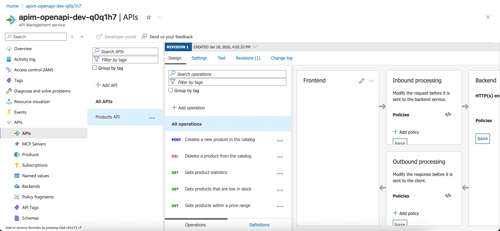
The GitHub Actions workflow builds the .NET API, generates the OpenAPI spec at build time, deploys the application, and then runs an az apim api import command that syncs the spec to APIM. Every deployment automatically updates the documentation.

A quick note: for this demo, we're using a build-time generated spec, which keeps things simple. In practice, you’ll likely need to point APIM at your runtime spec endpoint instead (https://YOUR_URL/swagger/v1/swagger.json). Dependency injection, middleware, and certain OpenAPI generators can complicate getting a build-time spec.
The result:
Setting Up the MCP Server
With your API deployed and its OpenAPI spec synced to APIM, exposing it as an MCP server is straightforward. In the Azure portal, navigate to your APIM instance, select MCP Servers from the left menu, and create a new server by selecting your API and the operations you want to expose as tools. Once configured, you can connect to it from VS Code by adding the server URL. When you test it in agent mode with a prompt like "Show me all tools" the LLM uses your OpenAPI descriptions to determine which tool to call and how to call it. This is where everything clicks: your well-documented API, automatically synced to APIM, is now accessible to AI agents without any custom integration code.

Once connected, VS Code displays all the tools exposed by your MCP server. Each tool maps directly to an API operation, complete with the descriptions you wrote in your OpenAPI spec.

Putting it all together, we now have a simple workflow that ensures our code remains the source of truth. We don't have to remember to update the documentation and sync APIM manually, and our APIs have a clear path to staying well-maintained and documented. This clears the way for us to build out MCP servers with confidence. As always, you can check the code out on our GitHub.
(Note that we didn’t make this a fully operational API. If you pull down the code and want the MCP server to work past tool discovery, you’ll have to do that.)
Final Thoughts
As the AI hype continues, let's remember not to lose sight of the foundational parts of delivering software. These fundamentals are now even more important as AI drives us to increase the rate at which we scale.